|
|
Latest Articles

New Movies








Foreign





|
![Download Sketch 58 [Intel] [TNT] torrent](/images/download_normal.gif)
Torrent Description
Apple » Apple Macintosh » Программы для создания и обработки графики (Mac OS)
Sketch 58 Год выпуска: 17 Сентября 2019. Версия: 58 Разработчик: Bohemian Coding Платформа: Intel only. Таблетка: Не требуется (инсталлятор уже пролечен, K'ed by TNT) Язык интерфейса: Английский. Системные требования: • macOS High Sierra (10.13.4) или более поздней версии. • Любой 64-разрядный Intel ® Mac. Описание: Sketch - один из лучших профессиональных векторных редакторов под Mac OS! Мощный, простой, быстрый, гибкий редактор для дизайна интерфейсов. Sketch имеет все необходимые инструменты для любого, даже наиболее требовательного дизайнера. Слайсы, текстовые стили, линейки, направляющие и сетки – лишь некоторые из них. Sketch умеет читать из (.sketch, .drawit, .svg), импортировать (.pdf, .eps, .jpg, .tif, .png, .gif и т.д.), и экспортировать в следующие виды форматов (.pdf, .svg, .eps, .jpg, .tif, .png) Sketch 58 управляет обновлением плагинов и несовместимыми плагинами. Также улучшено всплывающее меню выбора цвета, режим презентации и многое другое. [spoiler="Основные функции Sketch v.58:"] - Теперь плагины автоматически обновляются в Sketch, и мы отключили несовместимые плагины, чтобы они не мешали работе в Sketch - Всплывающее меню выбора цвета теперь прокручивается, а цветовая палитра складывается - Мы сделали некоторые полезные улучшения привязки точек в работе с вектором - Более 50 других улучшений и исправлений ошибок, включая сочетания клавиш для перемещения слоев и обновленный режим презентации - Улучшенный менеджер плагинов Обновление плагинов вручную – это боль. Вы должны найти сайт каждого плагина и определить, доступна ли его новая версия. Некоторые плагины имеют свой собственный механизм обновления, а есть некоторые классные сторонние менеджеры плагинов, но мы подумали, что было бы полезно сделать этот опыт проще и последовательнее. Теперь автоматическое обновление плагинов поддерживается в Sketch. Если похоже, что обновление плагина несовместимо с последней версией Sketch, мы отключим этот плагин, чтобы он не нарушал порядок. Как только совместимое обновление будет доступно, мы уведомим вас и спросим, хотите ли вы его установить. Теперь плагины сразу же удаляются из меню плагинов, если вы отключите их. Улучшенное меню выбора цвета Когда вы работаете в документе с обширным руководством по стилю лежащим в его основе, скорее всего, у вас есть набор цветовых пресетов. В Sketch 58 мы внесли некоторые обновления для всплывающего цветового меню для таких людей, как вы. В частности, теперь всплывающее меню прокручивается, если у вас много сохраненных цветовых пресетов. Другими словами, оно не исчезнет в нижней части экрана. Еще лучше, если вы один из тех людей с множеством цветовых пресетов, то, скорее всего, палитра цветов не понадобится вам слишком часто, поэтому мы сделали ее складной. Улучшенная привязка в работе с вектором Рисование совершенных и точных фигур может быть медленным, когда вам нужно разместить точку в произвольной позиции, а затем тщательно выравнять её с существующими точками. Теперь в Sketch 58 появятся быстрые направляющие, при наведении курсора на координаты фигуры x или y, чтобы помочь вам разместить следующую векторную точку. Это еще одно изменение, которое, как мы надеемся, облегчит вашу жизнь, а наши векторные инструменты станут более функциональными. Более согласованные меню В Sketch 58 мы переместили несколько пунктов меню для большей последовательности, и чтобы уступить дорогу новым пунктам, которые скоро появятся. Мы подумали, что отметим это на всякий случай, если у вас настроены какие-либо пользовательские сочетания клавиш. Не беспокойтесь, ваш любимый пункт меню все еще рядом, просто у него теперь новый дом (или, возможно, новое имя). Более 50 изменений, улучшений и исправлений ошибок В очередной раз, мы сделали несколько небольших улучшений для Sketch на основе ваших отзывов, а также исправили ряд существенных ошибок. Вот наиболее важные из них: - В настройках можно выбрать, на сколько пикселей перемещать слои с помощью клавиш со стрелками или с зажатым Shift + клавиши со стрелками - Режим презентации был изменен, чтобы просто скрыть пользовательский интерфейс, а не открывать полноэкранный режим (теперь он также работает с окнами, содержащими вкладки) - Мы добавили возможность выбирать между выделением точки или замыканием кривой при нажатии на первую точку в векторной фигуре - Ограничения для изменения размера слоя теперь имеют свои собственные сочетания клавиш (вы найдете их в Layer › Constraints menu) [/spoiler] [spoiler="Что нового"] Note: Additional info here What's New Version 58 - 17 September, 2019: • Introducing Smart Layout: With Smart Layout, we're making Symbols more powerful and supercharging your workflow when it comes to using them in your designs. With it, you can set a direction for Symbols to resize when you change their overrides, while keeping the spacing between different layers in that Symbol consistent. Better still, you can set different Smart Layout settings for Nested Symbols and even groups within Symbols. It's incredibly powerful and we can't wait to see how it'll improve your workflow. What’s improved: • We've made the Welcome Window better, bigger, cleaner and more snappy. You can browse your Cloud documents by Project in a new sidebar on the left, and we've given thumbnails plenty more space so you can see more of your documents without scrolling. • Along with browsing Projects in the Welcome Window, you'll now have the option to pick a Project when you save a new Cloud document for the first time. What’s fixed: • Fixed a bug where Sketch would believe you were offline and not allow you to upload new Cloud documents after you put your Mac to sleep or temporarily disconnected from the internet. • Fixed a bug where text overrides might reset or clear themselves if you clicked in and out of a text override field in the Inspector. • Fixed a bug where Symbol instances on your Canvas would not pick up changes you made to a text layer in that Symbol's master. • Fixed a bug where you might see the Canvas flash if you switch from a different app to Sketch when it's in full screen mode. • Fixed a crash that could occur if you created a particularly big grid. • Fixed a bug where resizing multiple layers with a small width or height but large distance between them would cause either their height or width to increase unexpectedly. • Fixed a bug where performing a Union operation on straight lines would make the combined shape disappear. • Fixed a bug where an artboard you hovered over wouldn't highlight when if you were in Prototyping mode. • Fixed a bug where your Show Layer Selection preference would reset itself when you restart Sketch. • Fixed a bug that could result in Sketch failing to respond (hanging) in a few different situations. If you've been in touch about Sketch being unresponsive, this one is for you. • Fixed a few different bugs related to how nested overrides highlight when you select them on the Canvas. If you'd selected a nested override and couldn't see it highlighted on the Canvas properly, you'll be pleased to know this update puts that right. • Fixed a bug that could cause performance issues and slow things down if you selected certain Symbol masters with complex overrides. Version 57.1 - 15 August, 2019: • Bug Fixes: This update fixes a bug where selections on the Canvas could appear offset from your cursor, a crash that could occur when switching between Layer Styles with certain names, and a crash that could occur in documents with certain Boolean Operations. Version 57 - 14 August, 2019: What’s improved • If you use the arrow keys on your keyboard with the Rotate tool to adjust a layer, we’ll now hide the selection handles and show the right values in the Inspector. • Sometimes it’s difficult to distinguish between solid and gradient presets in the Color Popover, so we’ve given them their own their own headings to make it easier to find what you need. • You can now paste rich text from the Clipboard directly into the Canvas by choosing Paste as Rich Text in the Edit menu. Previously, we only enabled this in text editing mode, but now it’s always there. • We’ve changed a few arrangement shortcuts. Send Backward is now ⌘ [ and Bring Forward is ⌘ ]. Send to Back is now ⌘ ⌥ [ and Bring to Front is ⌘ ⌥ ]. If you’d like to use the old shortcut or something totally different, you can create custom keyboard shortcuts in System Preferences. • We’ve made it easier to work with very large grids. Scrolling around them, moving them and changing colors should all feel faster and smoother. • You can now set a default layer style from the Layer menu in vector editing mode if you’ve selected a single path or shape group. What’s fixed • Fixed a bug where you might see the wrong cursor if you hover over Inspector labels with your language set as Chinese. • Fixed a bug where the Layer List would scroll to the top if you hit Undo in a document with a long list of layers. • Fixed a bug where Smart Distribute handles could look squashed if you launched Sketch on a Retina display then moved the document to a non-Retina display. • Fixed a bug where you wouldn’t see a proper preview of your work in Quick Look in the Finder. • Fixed a bug where where you couldn’t insert an image by selecting one from your Photos Library in the Finder sheet. This might mean we’ll ask for permission to access your photos if you haven’t granted it already. • Fixed a crash that could occur if you tried to apply an Outer Border to certain paths. • Fixed a bug where an Artboard might lose its preset if you converted it into a Symbol. • Fixed a bug where a landscape Artboard might unexpectedly switch to portrait if you held shift and dragged to resize it. • Fixed a bug where images might not be properly included as part of a group if that image overlapped with a nearby Artboard. • Fixed a bug where inserting a line while holding shift wouldn’t always respect pixel rounding. • Fixed a crash that could occur when you try to print or adjust your print settings. • Fixed a bug where pressing Control and Option keys at the same time wouldn’t correctly show the distance between a text layer’s baseline and another text layer’s cap height. • Fixed a bug where a Cloud Library update would fail because of an incorrect version/compatibility number. We’ll also be clearer in telling you when a Library is incompatible. • Fixed a bug where you couldn’t set any border position other than inner as part of a default layer style. [/spoiler] [spoiler="Способ установки"] • Смонтируйте образ и ознакомиться с Help.txt почему именно так … • Дальше на выбор, установка как обычно или с помощью Open Gatekeeper friendly • Программу не обновлять! [/spoiler] [spoiler="Невозможно запустить программу из-за повреждения"] Читаем внимательно Gatekeeper Коротко: Откройте Системные настройки > Защита и безопасность > Общие, и сделайте как на скрине. 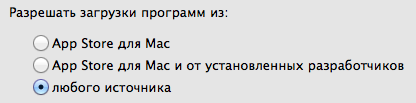 [/spoiler] [spoiler="Скриншот окна About"] [/spoiler] [spoiler="Скриншоты"]   [/spoiler] [hr] Если наблюдаете проблемы со скачиванием-раздачей, воспользуйтесь программой Rutracker Proxy: https://rutracker.org/forum/viewtopic.php?t=5403116, https://github.com/RutrackerOrg/rutracker-proxy/releases или посмотрите соответствующий раздел на форуме: https://rutracker.org/forum/viewforum.php?f=2260. Очень важно и необходимо наладить связь с серверами-анонсерами, чтобы находить пиров, беспрепятственно скачивать и раздавать. Если при рабочем статусе bt-трекеров в профиле всё ещё нет раздач, пожалуйста, обновите Passkey: https://rutracker.org/forum/viewtopic.php?p=69197660#69197660. Удачи! ПОВТОРЮСЬ! Для тех, кто до сих пор испытывает затруднения со скачиванием релизов на rutracker.org, скачайте себе вот это RuTracker proxy, установите его на свой мак, запускаете его, затем свой торрент-клиент, лёгкая настройка его, всё! И будет вам счастье!!! Простая настройка вашего клиента будет показана при выборе вопросительного знака в окне приложения RuTracker proxy
Related Torrents
|
|||||||||||||||||||||||||||||||||||||||||||||||||||||||||||||||||||||||||



Home - Browse Torrents
ExtraTorrent.st is in compliance with copyrights
2025 ExtraTorrent.st